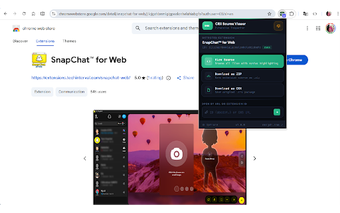
CRX Source Viewer: Inspect Chrome extensions before installation
CRX Source Viewer by Rob Wu is a Chrome extension that exposes extension source so users can inspect code and metadata before installing. The extension lets you open package files and run quick searches across files, while providing download options for offline review. It integrates with store pages and the browser UI. The target audience is developers and security auditors who need transparent, pre-installation inspection in their review workflows.
It reveals extension internals without requiring installation
The extension presents internal files directly from store listings, giving immediate access to manifest entries and other metadata without adding an extension to the browser. Syntax highlighting renders common web languages for easier reading, and a built-in search helps locate functions or suspicious strings, which makes quick verification of potentially risky behavior feasible before any installation action.
It supports repeatable audit and archival workflows
The tool can download an extension package as a ZIP archive for local analysis and archival purposes, enabling static scans with external tools and preserving copies for compliance. The project is open-source and maintained by the developer, which allows reviewers to audit the viewer itself prior to relying on its output. These properties suit documented security checks and classroom demonstrations of extension structure.
It integrates with browsing workflows for rapid access
The extension adds a CRX button on Chrome Web Store pages and registers in the browser context menu for one-click entry from listings or pages. It accepts CRX, ZIP, and UserScript inputs and can inspect local CRX packages by URL or file path, which helps when analysts examine copies obtained outside the store or verify already-downloaded packages.
It matches developers and auditors but is not a development IDE
The extension runs on Chromium-based browsers, so desktop users on alternative Chromium clients can use the same inspection workflow. It is maintained by Rob Wu and has positive reception among developer users, supporting its credibility for audits. The viewer focuses on read-only inspection and archival, so it does not replace an integrated development environment when editing or runtime testing is required.
Practical for vetting extensions, not for in-browser development
CRX Source Viewer is a practical choice for developers and security auditors who make code inspection part of their extension vetting routine. Its narrow, inspection-first design makes it straightforward to include in review processes and reduces uncertainty before trusting third-party extensions. Teams that need to edit or execute modified extension code should pair it with separate development tools, because the extension concentrates on viewing and archiving rather than modification.
Pros
Inspect extensions on the Chrome Web Store before installation
Download extension packages as ZIP for offline analysis
Open-source project with strong developer reception
Compatible with Chromium-based browsers beyond Chrome
Cons
Read-only focus, not an in-browser code editor
Primarily oriented to store-page inspection; local workflows need file path or URL
Not designed for dynamic runtime debugging of extensions
Laws concerning the use of this software vary from country to country. We do not encourage or condone the use of this program if it is in violation of these laws. Softonic may receive a referral fee if you click or buy any of the products featured here.